Disclaimer:
This post reflects my personal experience working with Apex code across different teams and projects. These are my own views and not official Salesforce guidance.
Introduction
Spring ’26 (API v66.0) brings Apex Cursors to General Availability. If you've spent time building pagination in Salesforce - wrestling with OFFSET performance, Batch Apex rigidity, or governor limit math - this blog is worth your attention.
This post is based on hands-on POC experience in a live Spring ’26 org. The full working code (Apex + LWC) is linked at the end. Here, we'll focus on the concepts, patterns, and lessons learned.
What Is an Apex Cursor?
A cursor is a pointer to a SOQL query result set, not the result itself. You execute a query once via Database.cursor(), and Salesforce gives you a handle to the full result set. From there, you fetch records in chunks from any position - forward, backward, or jumping to an arbitrary offset.
No OFFSET clause. No re-executing the query. The cursor holds a snapshot of the result set at creation time, and you decide which slice to retrieve on each call.
An important design detail: Apex cursors are stateless. They don't track your position for you. You are responsible for managing the offsets or indices in your own code.
Two Flavors: Cursor vs PaginationCursor
Spring ’26 introduces two distinct cursor types, each designed for a different use case.
Database.Cursor
Created via Database.getCursor() (or Database.getCursorWithBinds() for bind variables). You call cursor.fetch(offset,count) and get a List
// NOTE: CursorResult is a custom wrapper class that you need to create.

   Database.Cursor cursor = Database.getCursor(
         'SELECT Id, Name, Industry, Phone, CreatedDate FROM Account ORDER BY Name'
   );
   Integer totalRecords = cursor.getNumRecords();

   CursorResult result = new CursorResult();
   result.cursor = cursor;
   result.totalRecords = totalRecords;
   result.totalPages = (Integer) Math.ceil((Decimal) totalRecords / DEFAULT_PAGE_SIZE);
   result.records = totalRecords > 0 ? cursor.fetch(0, Math.min(DEFAULT_PAGE_SIZE, totalRecords)) : new List<Account>();
   result.currentPage = 1;
Navigation is offset-based: You can jump to any page instantly - page 1, page 50, page 101 - with simple arithmetic.
   Integer offset = (page - 1) * pageSize;
   Integer fetchCount = Math.min(pageSize, cursor.getNumRecords() - offset);

   CursorResult result = new CursorResult();
   result.cursor = cursor;
   result.records = fetchCount > 0 ? cursor.fetch(offset, fetchCount) : new List<Account>();
   result.currentPage = page;
It supports up to 50 million rows per cursor, with a daily limit of 10,000 cursor instances per org. The trade-off: If records are deleted after the cursor is created, a page may return fewer records than requested. The cursor doesn't backfill.
Batch Apex has a fixed batch size for all transactions, one-directional processing, and limited control per transaction. Whereas, Cursor + Queueable can fetch 100 or 500 records as needed, supports bidirectional traversal, and provides fine-grained async limit utilization.
That’s why Cursor + Queueable can be a strong alternative to Batch Apex in many scenarios.
Database.PaginationCursor
Created via Database.getPaginationCursor(). Instead of returning a raw list, fetchPage(startIndex, pageSize) returns a Database.CursorFetchResult object that bundles the records with navigation metadata.
   Database.PaginationCursor pagCursor = Database.getPaginationCursor(
         'SELECT Id, Name, Industry, Phone, CreatedDate FROM Account ORDER BY Name'
   );
   Integer totalRecords = pagCursor.getNumRecords();

   PaginationCursorResult result = new PaginationCursorResult();
   result.paginationCursor = pagCursor;
   result.totalRecords = totalRecords;
   result.currentPage = 1;

   Database.CursorFetchResult fetchResult = pagCursor.fetchPage(0, DEFAULT_PAGE_SIZE);
   result.records = (List<Account>) fetchResult.getRecords();
   result.nextIndex = fetchResult.getNextIndex();
   result.deletedRows = fetchResult.getNumDeletedRecords();
   result.hasMorePages = fetchResult.isDone();
The headline feature: It automatically skips deleted records and still returns a full page. e.g., If 5 records were deleted since cursor creation, fetchPage() skips over them and gives you exactly the number of records you asked for. Your users never see a half-empty page.
Capabilities & limits:
- It supports up to 100,000 rows per cursor (smaller because it's designed for human-readable data).
- 200,000 cursor instances per org per day (20x more than standard cursor).
- The maximum pageSize per
fetchPage()call is 2000 rows.
This is built for the scenario where many concurrent users are browsing paginated record lists.
Quick Comparison
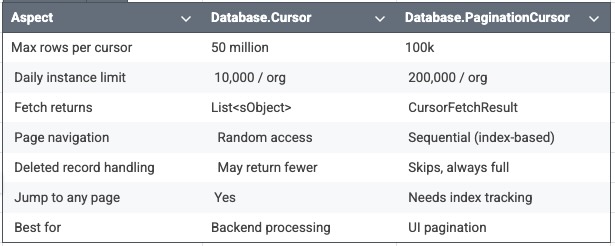
What We Built
For the POC, we paginated Account records (10 per page) using
Database.PaginationCursor, wired to a Lightning Web Component with First, Previous, Next, and Last buttons. We also built an equivalent demo using the standard Cursor as well.
How It Works
The full code is in the GitHub repo (linked at the end). Here's what matters conceptually.
1. Init — One Cursor, One Snapshot
On component load, the Apex controller creates a PaginationCursor from a SOQL query and fetches page 1. It returns three things the LWC needs: the cursor itself (serialized via @AuraEnabled), the first page of records, and the totalRecords count.
The cursor is a snapshot, and totalRecords is fixed at creation time and never changes. The LWC stores it once and derives total pages locally. No need to re-ask the server on every page turn.
Both cursor types support @AuraEnabled serialization out of the box. You pass them in a wrapper class, the LWC holds the cursor, and sends it back on each page request. Stateless. No server-side session.
2. Forward Navigation — nextIndex
After each fetchPage() call, a CursorFetchResult is returned with a nextIndex - the exact position where the next page starts. The LWC stores this value and passes it back to Apex when the user clicks Next.
3. Backward Navigation - you track it
There’s no getPreviousIndex() method. PaginationCursor is forward-oriented by design. So the LWC maintains a simple array (pageStartIndices) that records the startIndex for each page as the user navigates forward. Going back is a lookup into that array.
4. Jump to Last Page
Even though PaginationCursor uses index-based navigation, fetchPage() accepts any valid offset. Jumping to the last page is straightforward :
startIndex = (totalPages - 1) * pageSize
The cursor starts from that position and handles any deleted-record skipping internally.
5. Going Back from Last
On the last page, if there are 88 records and the LWC requests 10 starting at index 80, only 8 remain. Without clamping the fetch size, the platform throws a "Fetch beyond bound" error.
The fix:
Math.min(pageSize, totalRecords - startIndex)
This applies to both cursor types.
Gotchas We Hit (So You Don’t Have To)
-
Fetch beyond bound
Clamp fetch size on the last page. -
Method name mismatch
Docs mentiongetDeletedRows()— the real method is
getNumDeletedRecords(). -
Cursor is a snapshot
Record count never updates after creation. -
It is efficient, but not free
Eachfetch()orfetchPage()call counts against the SOQL query limit, and the rows fetched count against the SOQL row limit -
Cursors expire
Same rules as API Query cursors. -
Two exception types
System.FatalCursorException(non-recoverable)System.TransientCursorException(safe to retry)
-
@AuraEnabled serialization works
Both cursor types serialize cleanly for LWC round-trips.
When to Use Which
Use Database.Cursor when you need to:
- Process millions of records via Queueable chains
- Replace Batch Apex with finer control
- Perform Random-access page jump by offset
- Do backend automation
Use Database.PaginationCursor when:
- Building UI pagination
- Page size consistency matters
- Records may be deleted mid-session
- There are many concurrent users.
- The dataset is under 100K.
Monitoring Cursor Usage
You can track cursor consumption programmatically using the Limits and OrgLimits classes. More details in Resources.